Microsoft 365 Outage Phishing: IoCs, Lure Anatomy and What to Do Now
Microsoft warned of phishing that exploits the 12 Nov Microsoft 365 outage. How the lure works and what security teams should do now...
On 12 November, Microsoft 365 went down for roughly a day, taking Outlook, Teams and Copilot with it. Within hours, attackers were already using the disruption as bait. Microsoft Threat Intelligence has since warned of a live phishing campaign that impersonates service health notices and quotes a real incident number. This post walks through how the lure works, what is still unknown, the indicators Microsoft has published, and what security teams should do now.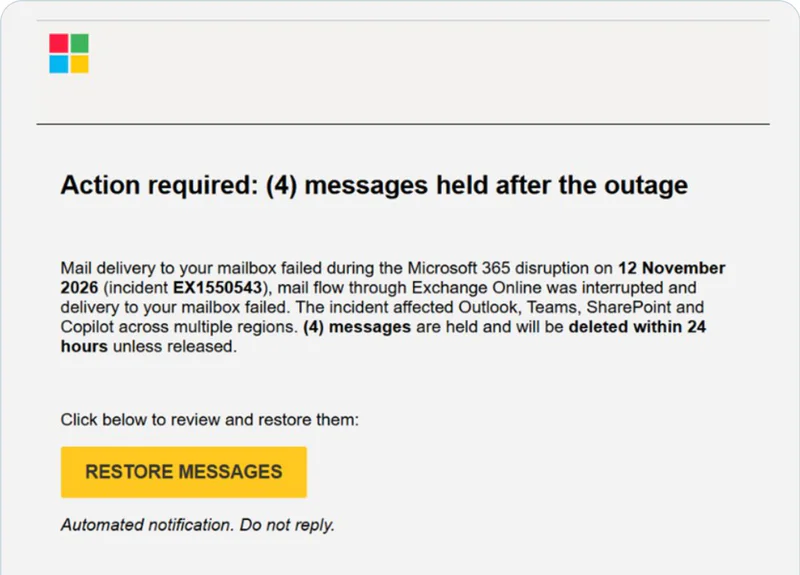
What happened
The outage began on the afternoon of Thursday 12 November (US Eastern time), and Gulf Business reported that it affected organisations in more than 70 countries. Microsoft attributed it to an issue during an earlier network capacity upgrade and said it saw no sign of malicious activity. It apologised on Friday, nearly 24 hours after connectivity problems started, and promised a full post-incident report.
That is the important framing: the outage itself was not an attack. The phishing campaign is a separate event that took advantage of it.
How the lure works

Microsoft Threat Intelligence detected some of the emails on 13 November and warned publicly on X on 14 November. Cyber Security News' write-up covers the same indicators. The messages share a recognisable pattern:
They copy a service health notice. The emails reference the genuine Exchange Online incident EX1550543, which makes the request feel tied to a real, ongoing problem.
They manufacture a deadline. Recipients are falsely told that messages were held during the outage and will be deleted within 24 hours unless they click to restore them.
They look like internal notices. Subject lines follow the pattern "Outage – [six-character code]", and sender display names pair an organisation-specific prefix with "Outage Notification" or "Service Health".
They hide behind a trusted sender. The links use recipient-specific SendGrid click tracking before redirecting to reallifeaccounting[.]com. Microsoft named three sender domains: moments-notice[.]com, planetmaison[.]com and newbooker[.]com.
The example Microsoft shared, shown at the top of this post, is headed "Action required: (4) messages held after the outage". It repeats the incident number and the 24-hour warning, then offers a single yellow "Restore messages" button. Similar messages reached organisations across multiple US sectors, so this was not aimed at one company.
What we know and what we do not
Microsoft described the activity as consistent with credential phishing, although credential collection and malware delivery have not been confirmed. It has not named the operator. Treat the campaign as an active phishing attempt, not as a confirmed breach, and avoid assuming links to earlier SendGrid-based campaigns without evidence.
Why outage lures work so well
Attackers did not need a clever exploit here. They needed good timing and three psychological levers.
A real event gives the lie a foundation. An email that cites a genuine incident number is not proof that its recovery link is safe, yet a real number is exactly what makes people drop their guard. Employees who spent a day wondering whether customer messages or payments were stuck are primed to believe a "restore" link.
Urgency removes the pause. A 24-hour deletion threat pushes people to click first and think later. That is the same pressure tactic used in invoice fraud and account-suspension scams, now attached to a topic everyone is talking about.
Trusted infrastructure carries the message. Mail sent through a legitimate delivery platform and links wrapped in a reputable tracking service inherit goodwill that a brand-new domain would not have. We have written about this pattern before, including attackers abusing Google infrastructure for phishing and how Cisco's URL rewriting was weaponised. Reputation-based filtering struggles when the sender really is a well-known service.
A pattern that keeps repeating
This is not the first time a large technology failure has been followed by phishing. We examined the same dynamic after a major endpoint-security incident in How the CrowdStrike episode exposes the gaps in email security. The specifics change, but the playbook does not: find the thing everyone is worried about, impersonate the party they trust to fix it, and add a deadline.
Indicators of compromise
These are the indicators Microsoft Threat Intelligence published on 14 November. They are defanged, so replace "[.]" with "." only inside your own hunting tools, never in a clickable link.
A few cautions when you use this list. The campaign is live, so operators may rotate domains and subjects. The incident number is real and will appear in genuine Microsoft communications, so do not block on it. Microsoft has not published file hashes or IP addresses for this campaign, and we have not added any.
What security teams should do now
Microsoft's own guidance gives a clear starting point.
Hunt for the indicators above. Search for the sender domains, the "Outage – [code]" subject pattern and the redirect destination. Microsoft points to Defender for Office 365 Threat Explorer and Defender XDR advanced hunting, using the EmailEvents, EmailUrlInfo and UrlClickEvents tables to identify suspicious messages, examine embedded URLs and investigate user clicks.
Check your Safe Links policies. Safe Links gives time-of-click protection against malicious URLs when properly configured, so confirm that yours is, rather than assuming it is.
Investigate clicks, not just delivery. A message landing in an inbox is one question. A recorded click is another, and it needs follow-up even if the page has since gone offline.
Tell users where to verify an outage. The simplest rule is also the strongest: confirm service disruptions directly through the Microsoft 365 admin center, never through a link in an email.
Brief help desks and executives. These are the people most likely to be pinged by worried colleagues, and the easiest to rush.
Lessons for the next outage
The next disruption will bring a new lure. A few habits make the difference.
Decide in advance how you will communicate during an outage. If employees know the official channel, a message from anywhere else stands out immediately.
Treat every "recovery" or "restore" link as untrusted by default. Genuine recovery from an outage rarely depends on a user clicking an emailed link.
Pre-write a short warning. A two-line note to staff, sent within hours of any major outage, closes the gap attackers rely on.
Look beyond sender reputation. Ask whether a message makes sense for this sender, this recipient and this moment. A health notice that arrives from an unfamiliar domain, with a hidden destination and a deadline, fails that test even when the sending platform is reputable.
The outage was an accident. The phishing campaign was a choice, and it arrived within a day. Preparing for the next one means assuming that any widely reported failure will be used against your users.
Frequently Asked Questions
Was the Microsoft 365 outage on 12 November caused by a cyberattack?
How can I tell a genuine Microsoft 365 outage notice from a phishing email?
What should security teams do if users may have clicked the outage phishing link?
Sign-up for a trial
Go live in minutes